
The digital landscape of 2026 is fiercely competitive. Businesses that once thrived on the simplicity of no-code platforms are now hitting a growth ceiling, constrained by limitations in scalability, security, and customization. As these companies mature, the conversation inevitably shifts from rapid prototyping to building robust, enterprise-grade applications. This journey almost always leads to the cloud, and to a critical decision point: choosing the right cloud platform for custom development. The two titans in this arena, Amazon Web Services (AWS) and Microsoft Azure, offer a staggering array of services, but which one is the right long-term partner for your business? This guide provides a comprehensive analysis to help you make an informed decision.
This in-depth guide is designed for technology leaders, CTOs, and engineering managers who are navigating the complex process of migrating from restrictive platforms to a scalable, custom-developed cloud solution. We will explore the fundamental differences between AWS and Azure, provide clear guidance on when to choose one over the other, and offer a practical roadmap for a successful migration. Our focus is not just on the technical specifications, but on the strategic business implications of your choice, ensuring that your investment in custom development yields the highest possible return.
Why Custom Development is the Key to Unlocking Cloud Potential
No-code and low-code platforms like Bubble and Lovable are excellent for validating ideas and building minimum viable products (MVPs) quickly. However, as businesses scale, they often encounter significant limitations that hinder growth and innovation. These platforms, while user-friendly, can become a bottleneck due to:
- Scalability Constraints: Inability to handle high traffic volumes or complex data processing.
- Security Vulnerabilities: Limited control over security protocols and compliance standards.
- Lack of Customization: Inability to build unique features or integrate with specialized third-party services.
- Vendor Lock-in: Difficulty in migrating data and applications to other platforms.
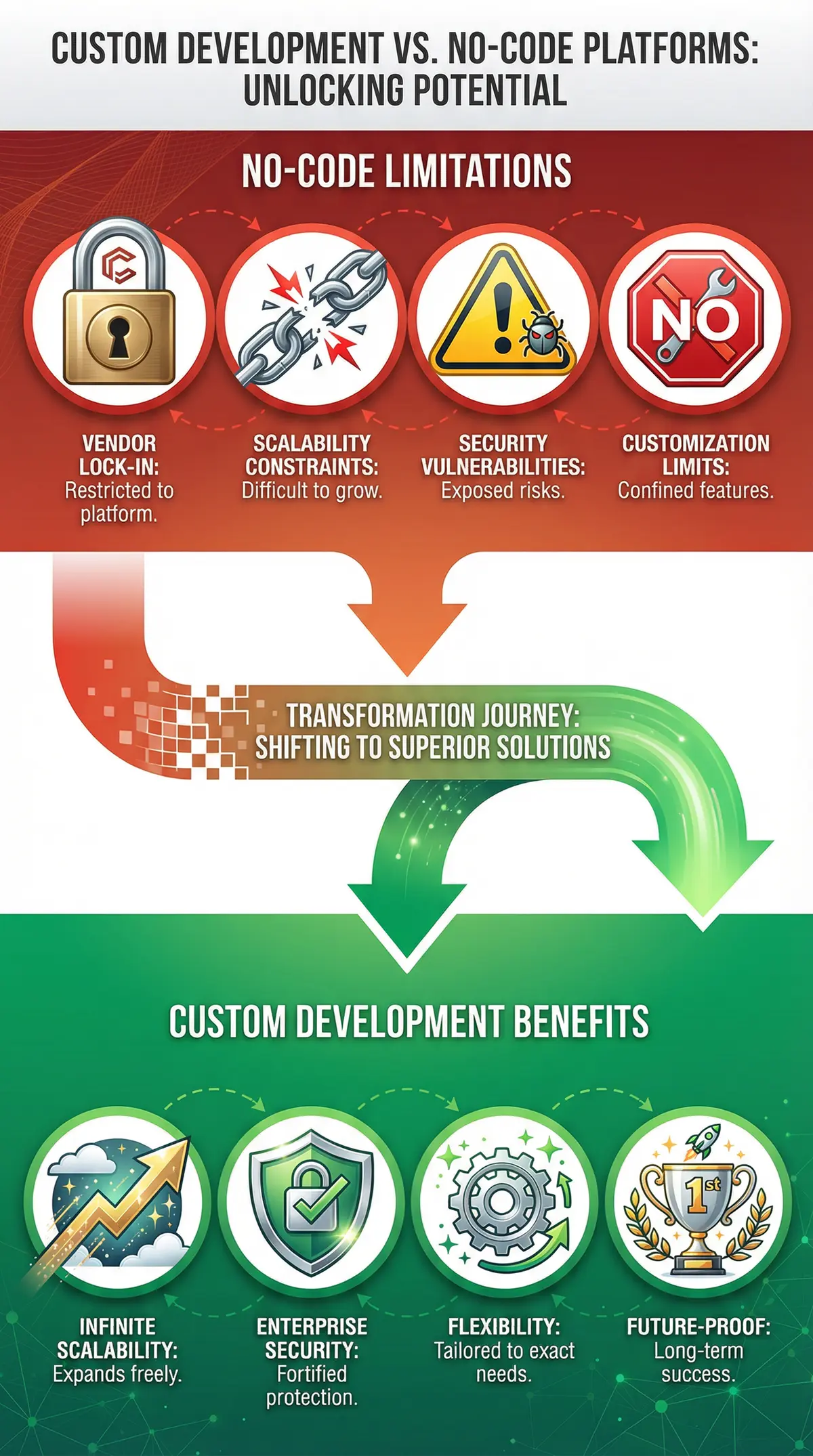
Custom development, in contrast, empowers businesses to build applications that are tailored to their specific needs and can evolve with their growth. When combined with the power of the cloud, custom development offers unparalleled advantages:
- Infinite Scalability: Build applications that can handle millions of users and scale resources on demand.
- Enterprise-Grade Security: Implement robust security measures and comply with industry standards like GDPR, HIPAA, and SOC 2.
- Unmatched Flexibility: Create unique user experiences and integrate with any API or third-party service.
- Future-Proof Architecture: Own your codebase and have the freedom to adapt to new technologies and market trends.
Transitioning from a no-code platform to a custom cloud solution is not just an upgrade; it is a strategic transformation that positions your business for long-term success. It is about moving from a rented space to owning your own digital real estate, with the freedom to build, innovate, and grow without limitations. Learn more about our custom development services.
AWS vs. Azure: A Comprehensive Platform Comparison for Custom Development
Choosing between AWS and Azure is one of the most critical decisions a business will make in its cloud journey. Both platforms are leaders in the industry, but they have distinct strengths and weaknesses that make them better suited for different use cases. Understanding these differences is key to selecting the right platform for your custom development project.
| Feature | Amazon Web Services (AWS) | Microsoft Azure |
|---|---|---|
| Market Share | 31% (Q4 2025) | 24% (Q4 2025) |
| Core Strengths | IaaS, extensive service portfolio, developer-centric | PaaS, enterprise software integration, hybrid cloud |
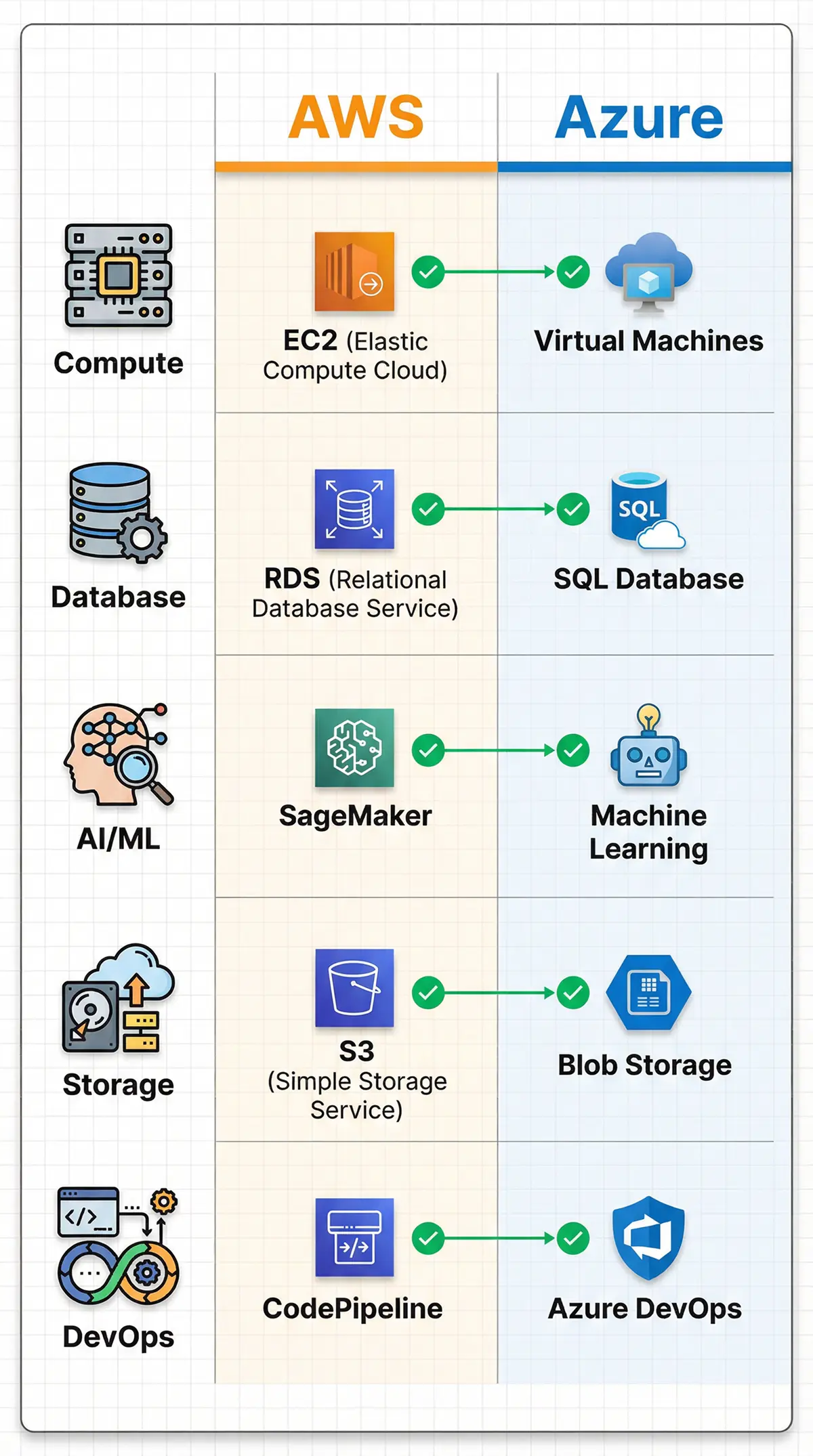
| Compute | EC2, Lambda, Elastic Beanstalk | Virtual Machines, Functions, App Service |
| Database | RDS, DynamoDB, Aurora | SQL Database, Cosmos DB, MySQL/PostgreSQL |
| AI/ML | SageMaker, Rekognition, Comprehend | Azure Machine Learning, Cognitive Services |
| DevOps | CodePipeline, CodeDeploy, CodeBuild | Azure DevOps, GitHub Actions |
| Pricing Model | Pay-as-you-go, Reserved Instances, Savings Plans | Pay-as-you-go, Reserved Instances, Hybrid Benefit |
When to Choose AWS for Your Custom Application
AWS has long been the dominant force in the cloud market, and for good reason. Its mature platform, extensive service offerings, and developer-friendly tools make it an excellent choice for a wide range of custom development projects. AWS is particularly well-suited for:
- Startups and Tech-Forward Companies: AWS's pay-as-you-go model and vast array of services make it easy for startups to get started and scale quickly.
- Complex, Scalable Applications: For applications that require high performance, global reach, and the ability to handle massive amounts of data, AWS's robust infrastructure is hard to beat.
- Open-Source Focused Development: AWS has a strong commitment to open-source technologies, offering managed services for popular tools like Kubernetes, PostgreSQL, and Redis.
- AI/ML Innovation: With services like Amazon SageMaker, AWS provides a comprehensive platform for building, training, and deploying machine learning models at scale.
When to Choose Azure for Your Custom Application
Azure has made significant strides in recent years, closing the gap with AWS and establishing itself as a formidable competitor. Azure's key differentiator is its deep integration with Microsoft's enterprise software ecosystem, making it the go-to choice for many large organizations. Azure is the ideal platform for:
- Enterprises with Existing Microsoft Investments: For companies that rely on Windows Server, Office 365, and other Microsoft products, Azure offers seamless integration and a unified experience.
- .NET and Windows-Based Development: Azure provides first-class support for .NET development, with tools and services that are optimized for the Microsoft stack.
- Hybrid Cloud Deployments: Azure's Hybrid Benefit and Azure Arc make it easier to manage and extend on-premises infrastructure to the cloud.
- PaaS-Centric Development: Azure's Platform-as-a-Service (PaaS) offerings, such as App Service and Azure Functions, simplify the development and deployment of cloud-native applications.
Migration Strategies: The 6 R's of Cloud Migration
Successfully migrating to the cloud requires a well-defined strategy. The "6 R's" framework provides a clear model for categorizing and approaching application migration. Understanding these options is crucial for developing a roadmap that aligns with your business goals and technical requirements.
- Rehost (Lift and Shift): This strategy involves moving applications from your on-premises environment to the cloud with minimal or no changes. It is the fastest migration path and is often used for large-scale legacy migrations. While it offers immediate cost savings on hardware and infrastructure, it does not take full advantage of cloud-native features.
- Replatform (Lift and Reshape): This approach involves making a few cloud optimizations to the application during the migration process. This could include upgrading to a managed database service or leveraging auto-scaling features. Replatforming offers a balance between the speed of rehosting and the benefits of refactoring.
- Refactor/Re-architect: This is the most advanced strategy, involving a complete redesign of the application to be cloud-native. While it requires the most significant investment in time and resources, it also delivers the greatest benefits in terms of scalability, performance, and cost-efficiency. This is where custom development truly shines, allowing you to build a future-proof application from the ground up.
- Repurchase: This strategy involves moving from a perpetual license to a Software-as-a-Service (SaaS) model. Instead of managing the application yourself, you subscribe to a service that is already hosted in the cloud. This is a good option for common business functions like CRM, HR, and email.
- Retire: As you assess your application portfolio, you will likely identify applications that are no longer needed. Retiring these applications can lead to significant cost savings and reduce the complexity of your IT environment.
- Retain: In some cases, it may make sense to keep certain applications on-premises. This could be due to regulatory compliance, data sovereignty requirements, or simply because the application is not a good fit for the cloud. A hybrid cloud strategy allows you to integrate your on-premises and cloud environments seamlessly.
Cost Analysis: AWS vs. Azure for Custom Development
Comparing the costs of AWS and Azure is not a simple task, as both platforms offer a wide range of services with different pricing models. However, by understanding the key pricing components and leveraging cost management tools, you can develop a clear picture of which platform will be more cost-effective for your custom development project.
| Cost Factor | Amazon Web Services (AWS) | Microsoft Azure |
|---|---|---|
| Compute | Per-second billing for EC2 instances | Per-minute billing for Virtual Machines |
| Storage | Tiered pricing for S3 object storage | Tiered pricing for Blob storage |
| Data Transfer | Free inbound, tiered pricing for outbound | Free inbound, tiered pricing for outbound |
| Discounts | Reserved Instances (1-3 year), Savings Plans | Reserved Instances (1-3 year), Hybrid Benefit |
| Cost Management | AWS Cost Explorer, AWS Budgets, AWS Trusted Advisor | Azure Cost Management, Azure Advisor |
Key Considerations for Cost Optimization:
- Right-Sizing: Choose the right instance types and storage classes for your workloads to avoid overprovisioning.
- Auto-Scaling: Leverage auto-scaling to automatically adjust resources based on demand, ensuring you only pay for what you use.
- Reserved Instances: For predictable workloads, Reserved Instances can offer significant savings over on-demand pricing.
- Spot Instances: For fault-tolerant workloads, Spot Instances can provide up to 90% savings compared to on-demand prices.
Deep Dive: Technical Comparison of AWS and Azure Services
Understanding the specific services offered by AWS and Azure is critical when planning your custom development project. While both platforms offer similar capabilities, the implementation details and feature sets can vary significantly. This section provides a detailed comparison of key service categories.
Compute Services
AWS Compute: Amazon EC2 (Elastic Compute Cloud) is the cornerstone of AWS compute services, offering a wide variety of instance types optimized for different workloads. For serverless computing, AWS Lambda allows you to run code without provisioning servers, with support for multiple programming languages including Node.js, Python, Java, and .NET. AWS Elastic Beanstalk provides a PaaS solution for deploying web applications without managing the underlying infrastructure.
Azure Compute: Azure Virtual Machines provide similar functionality to EC2, with strong support for Windows-based workloads. Azure Functions is the serverless offering, with excellent integration with the Microsoft ecosystem. Azure App Service is a fully managed PaaS that simplifies the deployment of web apps, mobile backends, and RESTful APIs. For enterprises heavily invested in .NET, Azure's compute services offer superior tooling and integration.
Database Services
AWS Database: Amazon RDS (Relational Database Service) supports multiple database engines including MySQL, PostgreSQL, SQL Server, and Oracle. Amazon Aurora is a MySQL and PostgreSQL-compatible database that delivers up to five times the performance of standard MySQL. For NoSQL workloads, DynamoDB provides a fully managed, serverless database with single-digit millisecond latency at any scale.
Azure Database: Azure SQL Database is a fully managed relational database service optimized for SQL Server workloads. Azure Database for MySQL and PostgreSQL offer managed services for open-source databases. Azure Cosmos DB is a globally distributed, multi-model NoSQL database that supports multiple APIs including MongoDB, Cassandra, and Gremlin. For organizations with complex data requirements, Cosmos DB's multi-region replication and low-latency access make it a compelling choice.
AI and Machine Learning
AWS AI/ML: Amazon SageMaker is a comprehensive platform for building, training, and deploying machine learning models. It provides built-in algorithms, support for popular frameworks like TensorFlow and PyTorch, and automated model tuning. AWS also offers specialized AI services like Amazon Rekognition for image and video analysis, Amazon Comprehend for natural language processing, and Amazon Polly for text-to-speech. Explore our AI development services.
Azure AI/ML: Azure Machine Learning provides a similar end-to-end platform for machine learning, with strong integration with Azure DevOps for MLOps workflows. Azure Cognitive Services offers pre-built AI models for vision, speech, language, and decision-making. For enterprises looking to integrate AI into existing applications, Azure's PaaS approach and pre-built models can significantly accelerate development.
DevOps and CI/CD
AWS DevOps: AWS CodePipeline, CodeBuild, and CodeDeploy provide a complete CI/CD solution for automating the build, test, and deployment process. AWS also offers strong integration with third-party tools like Jenkins, GitHub Actions, and GitLab CI. For infrastructure as code, AWS CloudFormation allows you to define and provision AWS resources using templates.
Azure DevOps: Azure DevOps is a comprehensive suite of development tools that includes Azure Boards for project management, Azure Repos for version control, Azure Pipelines for CI/CD, and Azure Test Plans for testing. The tight integration with GitHub (owned by Microsoft) makes Azure an attractive choice for teams already using GitHub for version control. Azure Resource Manager (ARM) templates provide infrastructure as code capabilities similar to CloudFormation.
Case Study: Successful Cloud Migration from No-Code to Custom Development
Company: TechFlow Solutions (anonymized)
Industry: Financial Technology
Challenge: Scaling limitations on Bubble platform, security compliance requirements (SOC 2, GDPR)
Solution: Migration to AWS with custom React/Node.js application
Timeline: 90 days
Results: 10x performance improvement, 40% cost reduction, full compliance certification
The Challenge
TechFlow Solutions started as a fintech startup using Bubble to quickly validate their product-market fit. Within 18 months, they had acquired 50,000 users and were processing $10 million in monthly transactions. However, they began experiencing critical issues:
- Performance Degradation: Page load times increased to 5-8 seconds during peak hours, causing user frustration and abandoned transactions.
- Security Concerns: Inability to implement custom encryption protocols and audit logging required for SOC 2 compliance.
- Integration Limitations: Difficulty integrating with banking APIs and payment processors that required custom authentication flows.
- Cost Escalation: Bubble's pricing model became increasingly expensive as their user base grew, with monthly costs exceeding $8,000.
The Solution
TechFlow partnered with WorksDelight to execute a comprehensive migration to AWS with a custom-built application. The migration strategy included:
- Architecture Design: Designed a microservices architecture using AWS ECS (Elastic Container Service) for containerized applications, with separate services for user management, transaction processing, and reporting.
- Database Migration: Migrated from Bubble's internal database to Amazon Aurora PostgreSQL, with read replicas for improved query performance.
- Security Implementation: Implemented AWS KMS (Key Management Service) for encryption at rest, AWS WAF (Web Application Firewall) for protection against common web exploits, and AWS CloudTrail for comprehensive audit logging.
- CI/CD Pipeline: Established a CI/CD pipeline using AWS CodePipeline and CodeBuild, enabling automated testing and deployment with zero downtime.
- Monitoring and Observability: Implemented Amazon CloudWatch for monitoring and alerting, with custom dashboards for tracking key performance indicators.
The Results
The migration delivered transformative results for TechFlow Solutions:
- Performance: Page load times decreased from 5-8 seconds to under 1 second, with API response times averaging 200ms.
- Cost Savings: Monthly infrastructure costs decreased from $8,000 to $4,800, despite handling 3x more traffic.
- Scalability: The application now handles 150,000 users with auto-scaling capabilities to manage traffic spikes.
- Compliance: Achieved SOC 2 Type II certification within 6 months of migration.
- Development Velocity: New features that previously took weeks to implement now deploy in days.
The 90-Day Cloud Migration Roadmap
A successful cloud migration requires careful planning and execution. This roadmap provides a structured approach to migrating from a no-code platform to a custom cloud solution in 90 days.
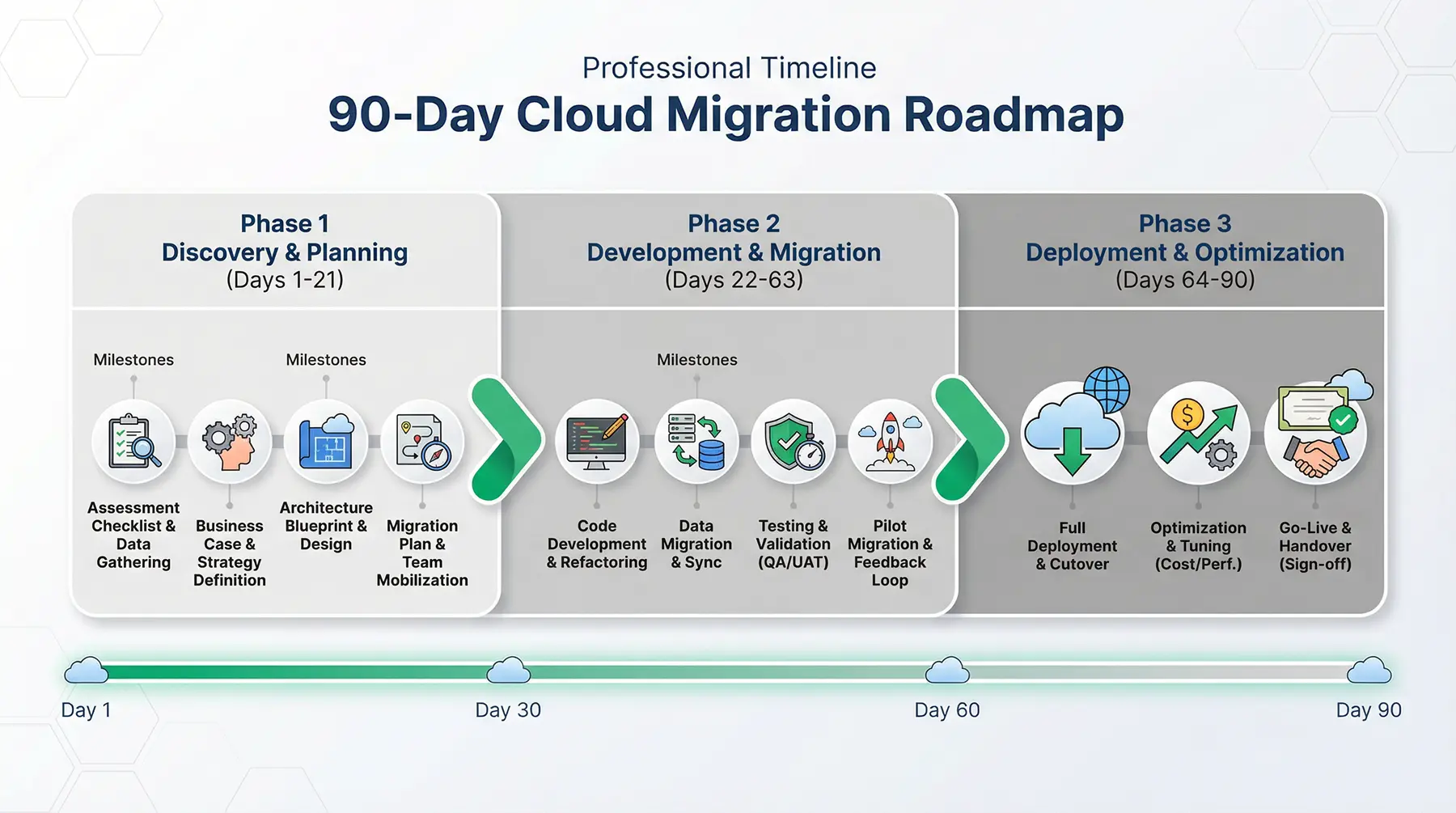
Phase 1: Discovery and Planning (Days 1-21)
Week 1: Assessment
- Conduct a comprehensive audit of your current application, including user flows, data models, integrations, and performance metrics.
- Identify critical features and prioritize them for the migration.
- Document security and compliance requirements.
- Establish success metrics and KPIs for the migration.
Week 2: Architecture Design
- Design the target architecture for your custom application, including compute, database, storage, and networking components.
- Choose between AWS and Azure based on your specific requirements and existing technology investments.
- Design the data migration strategy, including data transformation and validation processes.
- Plan the CI/CD pipeline and DevOps workflows.
Week 3: Team and Resource Planning
- Assemble the migration team, including cloud architects, developers, DevOps engineers, and QA specialists.
- Establish communication channels and project management processes.
- Set up development, staging, and production environments in the cloud.
- Procure necessary tools and licenses.
Phase 2: Development and Migration (Days 22-63)
Week 4-5: Core Application Development
- Build the core application infrastructure, including authentication, authorization, and user management.
- Develop the data access layer and integrate with the chosen database service.
- Implement the primary user flows and features.
- Set up the CI/CD pipeline for automated testing and deployment.
Week 6-7: Feature Development
- Develop the remaining features and integrations.
- Implement security controls, including encryption, access controls, and audit logging.
- Build monitoring and alerting systems.
- Conduct performance testing and optimization.
Week 8-9: Data Migration and Testing
- Execute the data migration from the no-code platform to the cloud database.
- Validate data integrity and completeness.
- Conduct comprehensive testing, including functional, integration, performance, and security testing.
- Address any bugs or issues identified during testing.
Phase 3: Deployment and Optimization (Days 64-90)
Week 10: Staged Rollout
- Deploy the application to the staging environment for final user acceptance testing.
- Conduct a pilot launch with a subset of users to gather feedback and identify any remaining issues.
- Monitor performance and stability closely during the pilot phase.
- Make any necessary adjustments based on user feedback.
Week 11: Production Launch
- Execute the production deployment with a comprehensive rollback plan in place.
- Monitor the application closely during the initial launch period.
- Provide user support and address any issues that arise.
- Communicate the launch to all stakeholders.
Week 12-13: Post-Launch Optimization
- Analyze performance metrics and identify opportunities for optimization.
- Implement cost optimization strategies, such as right-sizing instances and leveraging reserved capacity.
- Conduct a post-mortem review to document lessons learned and best practices.
- Plan for ongoing maintenance, updates, and feature enhancements.
Key Considerations for Choosing Between AWS and Azure
While both AWS and Azure are excellent platforms, certain factors should guide your decision based on your specific business context and technical requirements.
Choose AWS If:
- You are a startup or tech company prioritizing speed and innovation.
- Your development team is experienced with open-source technologies and Linux.
- You require the broadest range of services and the most mature ecosystem.
- You are building a greenfield application without existing Microsoft dependencies.
- You need advanced AI/ML capabilities and want access to the latest innovations.
Choose Azure If:
- You are an enterprise with significant investments in Microsoft technologies.
- Your development team is experienced with .NET and Windows Server.
- You require seamless integration with Office 365, Active Directory, and other Microsoft products.
- You are implementing a hybrid cloud strategy with on-premises infrastructure.
- You prefer a PaaS-centric approach to application development.
Your Partner in Cloud Migration and Custom Development
Navigating the complexities of cloud migration and custom development requires a partner with deep expertise in both AWS and Azure. At WorksDelight, we specialize in helping businesses like yours make the transition from restrictive no-code platforms to scalable, secure, and high-performance cloud applications. Our team of certified cloud architects and developers will work with you to:
- Develop a comprehensive cloud migration strategy tailored to your business goals.
- Design and build a custom application that meets your unique requirements.
- Migrate your existing data and applications to the cloud with minimal disruption.
- Optimize your cloud environment for cost, performance, and security.

Ready to unlock the full potential of the cloud?
Schedule a free consultation with our cloud migration experts
Conclusion: Making the Right Choice for Your Business
The decision between AWS and Azure for custom development is not a one-size-fits-all proposition. Both platforms offer world-class infrastructure, comprehensive service portfolios, and the ability to build scalable, secure, and high-performance applications. The right choice depends on your specific business requirements, existing technology investments, and long-term strategic goals.
For businesses outgrowing no-code platforms, the transition to custom development on AWS or Azure represents a critical inflection point. It is an opportunity to build a foundation for sustainable growth, unlock new capabilities, and gain a competitive advantage in your market. However, this transition requires careful planning, deep technical expertise, and a partner who understands both the business and technical dimensions of cloud migration.
At WorksDelight, we have helped dozens of companies successfully navigate this journey. Our team of certified cloud architects and developers brings deep expertise in both AWS and Azure, enabling us to provide unbiased guidance and deliver custom solutions that align with your unique needs. Whether you choose AWS, Azure, or a multi-cloud strategy, we are here to ensure your migration is successful and your investment delivers maximum value.
Take the next step in your cloud journey by contacting our team today. Let's build something extraordinary together.